
 Edictum
Edictum Console
Self-hostable operations console for governed AI agents. Visibility, live updates, and approval workflows for your agent fleet.
Right page if: you want an overview of what Edictum Console provides -- visibility, live contract updates, HITL approvals, fleet monitoring. Wrong page if: you want to deploy the console (see https://docs.edictum.ai/docs/console/setup) or understand the internal architecture (see https://docs.edictum.ai/docs/console/architecture). Gotcha: the console never evaluates contracts in production -- agents evaluate locally. The console is a coordination layer, not an enforcement point.
Self-hostable operations console for governed AI agents.
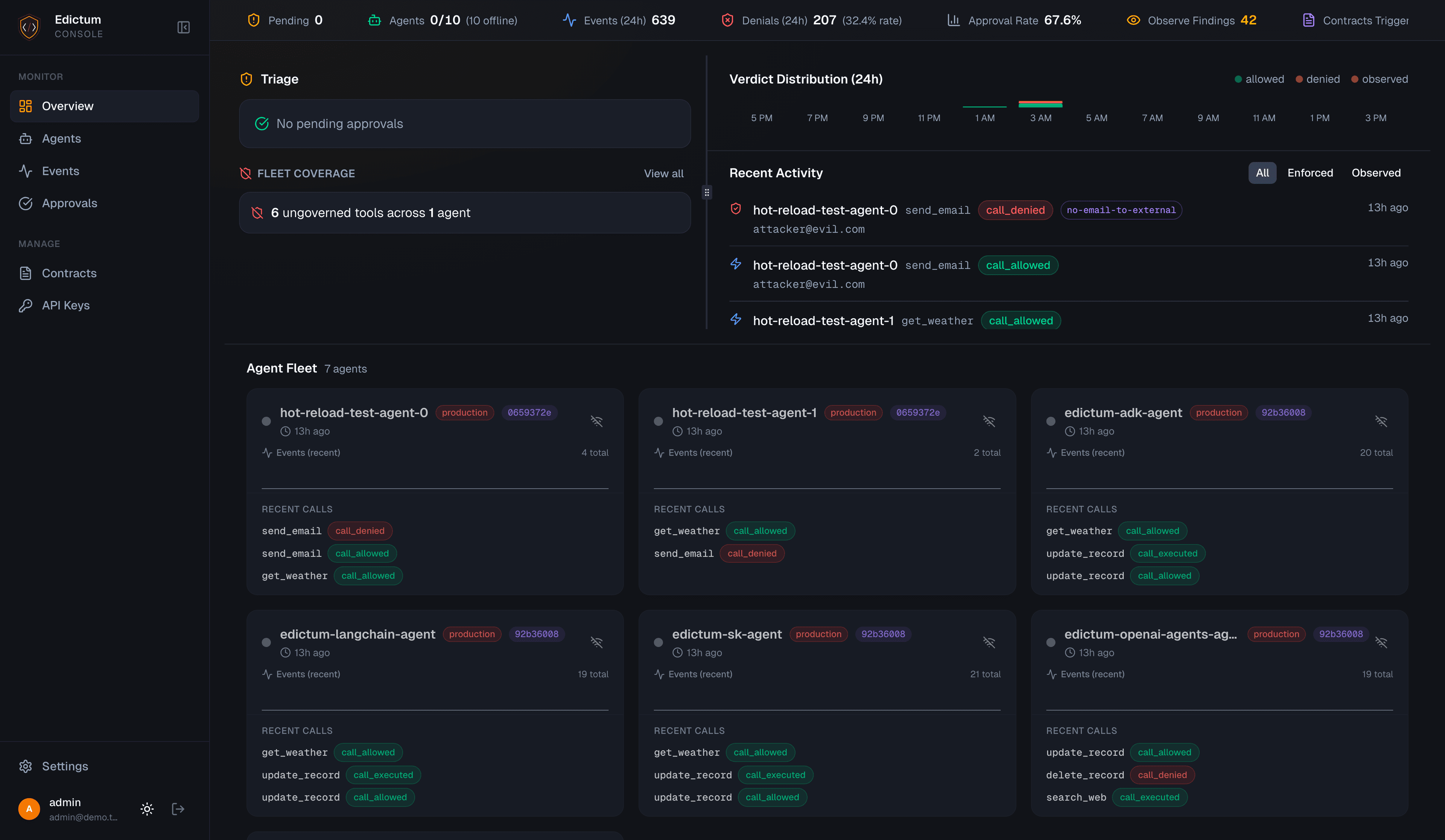
Edictum enforces contracts. Edictum Console shows you what happened, and lets you change what happens next -- without restarting agents.
Why This Exists
You deployed edictum contracts to your agent fleet. Tool calls are governed. But now:
No visibility. An agent denied a call in production at 3 AM. Which contract? Which tool? What were the arguments? You grep through logs and find a one-line denial message. No context, no history, no way to search.
No live updates. You tuned a contract -- relaxed a threshold, added an exception. To pick it up, every agent needs a restart. In production. With active sessions. At 3 AM.
No approval workflow. Your agent needs human sign-off before executing a destructive operation. The contract says effect: approval_required. But where does the approval request go? Who sees it? How does the agent get the decision back?
Edictum Console solves all three. One Docker image. Five minutes to deploy.
What You Get
Contract Management
Individual contracts stored in a versioned library. Composable three-level model:
| Level | What it is | Purpose |
|---|---|---|
| Contract | Individual governance rule | Authoring unit. Versioned. Reusable across bundles. |
| Composition | Ordered recipe of contracts | Assembly recipe. Per-contract mode overrides (enforce/observe). |
| Bundle | Assembled, signed YAML | Deployed artifact. Pushed to agents via SSE. |
Mix and match contracts into compositions, preview the assembled YAML, then deploy. Every upload auto-increments version with SHA-256 revision hash for drift detection. YAML diff viewer between any two versions.
Playground -- evaluate contracts against test tool calls without deploying. Enter tool name + JSON args, select a bundle, see verdict + contract evaluation trace.
AI contract assistant -- streaming chat that knows the full edictum contract schema. Supports Anthropic, OpenAI, OpenRouter, and Ollama.
Live Hot-Reload
Deploy a contract -> connected agents pick it up instantly. Zero downtime, zero restarts.
- SSE push: agents subscribe to the stream with their environment. On deploy, the server pushes a
contract_updateevent with the signed YAML. - Bundle-filtered streams: agents only receive updates for their assigned bundle.
- Ed25519 signed bundles: every deployed bundle is cryptographically signed. Signature + public key included in the SSE event.
- Key rotation: generate a new Ed25519 keypair, auto-re-sign all currently-deployed bundles.
- Auto-reconnect: SDK reconnects with exponential backoff (1s initial, 60s max).
Human-in-the-Loop Approvals
Agent requests approval -> notification fires -> human approves or denies -> agent proceeds.
Agent calls tool -> contract says "approval_required"
-> Notification fires (Telegram / Slack / Discord / Email / Webhook)
-> Human clicks Approve or Deny (in chat or dashboard)
-> Agent receives decision -> tool executes or is denied
Interactive notifications: approve/deny buttons directly in Telegram, Slack, and Discord. Click a button -> approval recorded -> agent proceeds. No need to open the dashboard.
Timeout handling: configurable timeout per approval with deny-or-allow timeout effect. Background worker expires overdue approvals automatically.
Notification Channels
Six channel types, configured in the dashboard -- no env vars, no restarts.
| Channel | Interactive Approve/Deny | Notes |
|---|---|---|
| Telegram | Yes | Inline keyboard buttons. Webhook secret validation. |
| Slack App | Yes | Block Kit action buttons. HMAC-SHA256 + replay protection. |
| Slack Webhook | No | One-way notifications with deep link to dashboard. |
| Discord | Yes | Component buttons. Ed25519 interaction verification. |
| Webhook | No | Generic HTTP POST with optional HMAC-SHA256. |
| No | SMTP with deep link button to dashboard. |
Routing filters per channel: environments, agent patterns (globs), contract names. Secrets encrypted at rest with NaCl SecretBox.
Audit Event Feed
Three-panel Datadog-style layout: faceted filter sidebar, event list with histogram, and detail panel.
- Faceted filters with counts: agent_id, tool_name, verdict, mode, contract name
- Time window selector (15m -> 30d + custom range)
- URL-driven filter state -- share a link, colleague sees the same view
- PostgreSQL-partitioned by month with configurable event purge
Fleet Monitoring
- Live connected agents: every SSE-connected agent with environment, bundle, contract version, and connected timestamp.
- Drift detection: per-agent comparison of reported contract version against currently deployed bundle.
- Coverage analysis: each tool classified as enforced, observed, or ungoverned. Fleet summary shows coverage percentage and ungoverned tools sorted by agent count.
- Agent detail page: coverage tab, analytics tab, contract change history.
Agent Assignment
Three-level bundle resolution (highest priority first):
| Priority | Source | Description |
|---|---|---|
| 1 | Explicit assignment | bundle_name set directly on the agent |
| 2 | Assignment rules | Pattern-matching rules with glob on agent_id + optional tag match |
| 3 | Agent-provided | bundle_name query parameter on SSE connection |
Bulk assignment, dry-run resolution, and priority-ordered rules.
How It Connects to Edictum
Core is standalone. guard = Edictum.from_yaml("contracts.yaml") works without a server. Console is an optional enhancement.
pip install edictum[server] adds the SDK that bridges agents to the console:
| SDK Class | Purpose |
|---|---|
EdictumServerClient | HTTP client (base_url, api_key, agent_id) |
ServerAuditSink | Batched event ingestion (50 events / 5s flush) |
ServerApprovalBackend | HITL approval polling |
ServerBackend | Session state storage |
ServerContractSource | SSE contract subscription with auto-reconnect |
Console never evaluates contracts in production. Agents evaluate locally. Console stores events, manages approvals, and pushes contract updates.
Security
Edictum Console is a security product. Every layer is designed with adversarial threat modeling.
- Local auth: email/password with bcrypt, server-side Redis sessions, HttpOnly cookies
- API keys: env-scoped, one-way bcrypt hashed, prefix-indexed
- Tenant isolation: every query filters by
tenant_id-- no exceptions - Ed25519 bundle signing: private keys encrypted at rest
- CSRF protection:
X-Requested-Withheader on cookie-auth mutations - Rate limiting: login + approval endpoints with sliding window
- Fail closed: server unreachable -> deny
- 43+ adversarial tests across 8 security boundaries
License
FSL-1.1-ALv2 — source available, converts to Apache 2.0 after two years.
Last updated on