
 Edictum
AI Contract Assistant
A streaming chat assistant that helps you write edictum contracts. Knows the full contract schema and answers questions about selectors, operators, and effects.
Right page if: you want to set up or use the AI chat assistant in the console that helps write edictum contracts. Wrong page if: you want to write contracts manually (see https://docs.edictum.ai/docs/contracts/yaml-reference) or understand contract types and operators (see https://docs.edictum.ai/docs/contracts/operators). Gotcha: user-provided YAML is injected as a user-context message, not appended to the system prompt -- this prevents prompt injection from contract content.
A streaming chat assistant that helps you write edictum contracts. Knows the full contract schema and answers questions about selectors, operators, and effects.
Supported Providers
| Provider | Default Model | Notes |
|---|---|---|
| Anthropic | claude-haiku-4-5-20251001 | Claude API key required |
| OpenAI | gpt-5-mini | OpenAI API key required |
| OpenRouter | qwen/qwen3-4b:free | OpenRouter API key; access to 100+ models |
| Ollama | llama3 | Local models, no API key needed; text-only (no tool validation) |
Setup
Dashboard > Settings > AI.
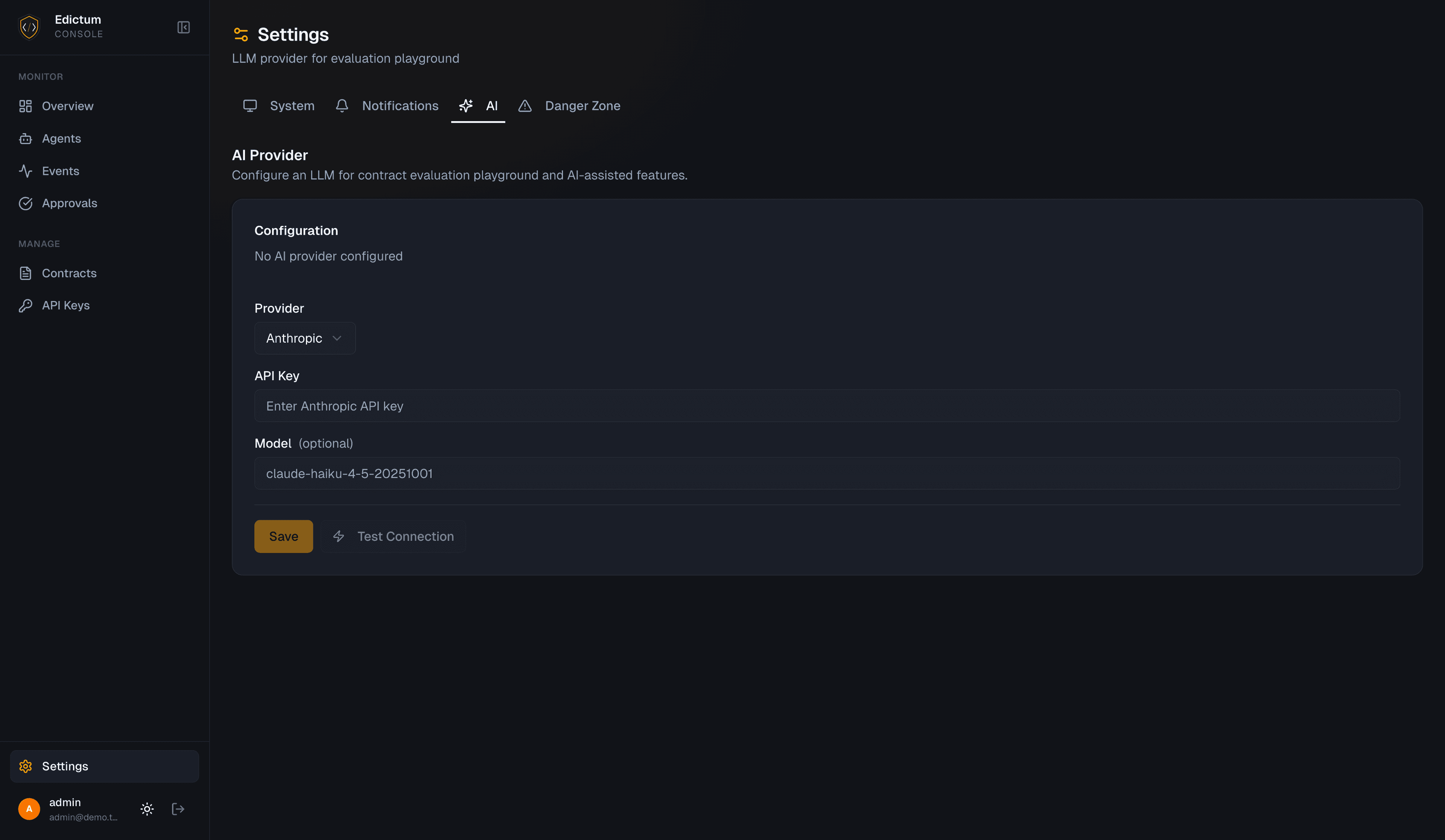
- Select a provider from the dropdown
- Enter your API key (not needed for Ollama)
- Optionally override the model name
- Optionally set a base URL (required for OpenRouter and Ollama)
- Click Test Connection
Test Connection
The test sends a probe request to the provider and returns:
- Model name confirmed
- Response latency (ms)
- Success/failure status
POST /api/v1/settings/ai/testProvider-Specific Configuration
Anthropic:
API Key: sk-ant-api03-...
Model: claude-haiku-4-5-20251001 (default)
OpenAI:
API Key: sk-...
Model: gpt-5-mini (default)
OpenRouter:
API Key: sk-or-v1-...
Base URL: https://openrouter.ai/api/v1
Model: qwen/qwen3-4b:free (default)
Ollama:
Base URL: http://localhost:11434
Model: llama3 (default)
No API key needed
Security
API Key Encryption
API keys are encrypted at rest using NaCl SecretBox. They are never stored in plaintext. In API responses, keys are masked (e.g. sk-ant-****xyz).
Base URL Validation
The base_url field is validated against SSRF rules on save and test. Private and internal network addresses are rejected with 422 Unprocessable Entity:
http://localhost/http://127.0.0.1http://10.x.x.x(RFC 1918 private range)http://192.168.x.x(RFC 1918 private range)http://172.16.x.x–http://172.31.x.x(RFC 1918 private range)- Link-local addresses (
169.254.x.x)
Only publicly routable URLs are accepted. This prevents the console from being used as an SSRF proxy to reach internal services.
Ollama users: If your Ollama instance runs on localhost or a private network address, it cannot be configured as a base URL in the hosted console. Run the console and Ollama on the same host and use a publicly routable URL, or self-host the console on the same network as Ollama.
Prompt Injection Prevention
User-provided YAML is injected as a user-context message, not appended to the system prompt. This prevents the assistant from treating user content as instructions.
Using the Assistant
The primary entry point is the generator hero at the top of the Library tab (Dashboard > Contracts > Library). It accepts a free-text prompt and offers suggestion chips for common contract patterns. Submitting opens the AI chat panel in a side sheet with your prompt pre-loaded.
The chat panel is also accessible directly from the right side of the Library tab for follow-up iterations without entering a new prompt.
What You Can Ask
- "Write a contract that blocks rm -rf commands"
- "What selectors can I use for post contracts?"
- "Why isn't my contract matching calls to read_file?"
- "Add a session limit of 100 tool calls"
- "Convert this contract to observe mode"
How It Works
The system prompt embeds the full edictum contract schema:
- 4 contract types (pre, post, session, sandbox)
- 13 selectors (args., result., etc.)
- 15 operators (equals, contains, starts_with, regex, etc.)
- 5 effects (allow, deny, approval_required, redact, log)
The assistant uses this knowledge to write correct YAML and explain contract behavior.
Tool Use
When you ask the assistant to write or refine a contract, it automatically validates and evaluates it before presenting the result:
validate_contract— called before presenting any contract YAML. Checks that the contract is structurally valid against the schema.evaluate_contract— called after validation. Tests the contract against simulated tool calls to verify it behaves as intended.
These calls appear in the chat UI as collapsible indicators showing the tool name, a status icon (success or error), and duration in milliseconds. You can expand them to see the full result.
Ollama does not support tool use. When using Ollama, the assistant returns contract YAML directly without running validation or evaluation. Review the output manually before deploying.
Context Resources
At the start of each conversation, the assistant pre-fetches context from your console instance:
| Resource | Description |
|---|---|
| Built-in templates | All available built-in contract templates |
| Existing contracts | Contracts currently in your library |
| Agent tool usage | Tool calls observed over the last 7 days |
This lets the assistant proactively suggest contracts based on what your agents are actually calling, and reference your existing contracts when answering questions.
Multi-Turn Conversations
The chat supports multi-turn conversations with streaming responses. Context is preserved within the session -- you can iterate on a contract across multiple messages.
Generate Description
When AI is configured, a sparkles button appears next to the Description field in the contract editor (both create and edit modes). Clicking it generates a one-sentence description from the contract's name, type, YAML definition, and tags.
The button is disabled when Name or Definition are empty — both are required inputs for generation. Generated descriptions count toward AI usage stats.
Usage Tracking
Dashboard > Settings > AI > Usage section.
Track AI usage per tenant:
| Metric | Description |
|---|---|
| Total tokens | Input + output tokens consumed |
| Estimated cost | Based on provider pricing |
| Query count | Number of assistant interactions |
| Avg tokens/sec | Streaming throughput |
| Daily chart | Usage breakdown by day |
Usage data is retained for 90 days. Older records are automatically purged on startup.
Cost Estimation
For OpenRouter models, pricing is fetched dynamically from the OpenRouter API (cached for 1 hour). For Anthropic and OpenAI, standard pricing tables are used.
API Endpoints
| Endpoint | Method | Description |
|---|---|---|
/api/v1/settings/ai | GET | Get current AI config (key masked) |
/api/v1/settings/ai | PUT | Update AI config |
/api/v1/settings/ai/test | POST | Test connection to provider |
/api/v1/settings/ai/usage | GET | Usage stats and daily breakdown |
/api/v1/contracts/assist | POST | Streaming chat endpoint |
/api/v1/contracts/generate-description | POST | Generate a one-sentence contract description |
Next Steps
- Dashboard Overview -- navigate the full dashboard
Last updated on